Dashboard
The Dashboard is home base. It's the page you land on after logging in, and it's built to answer one question in under ten seconds: "what needs my attention today?"
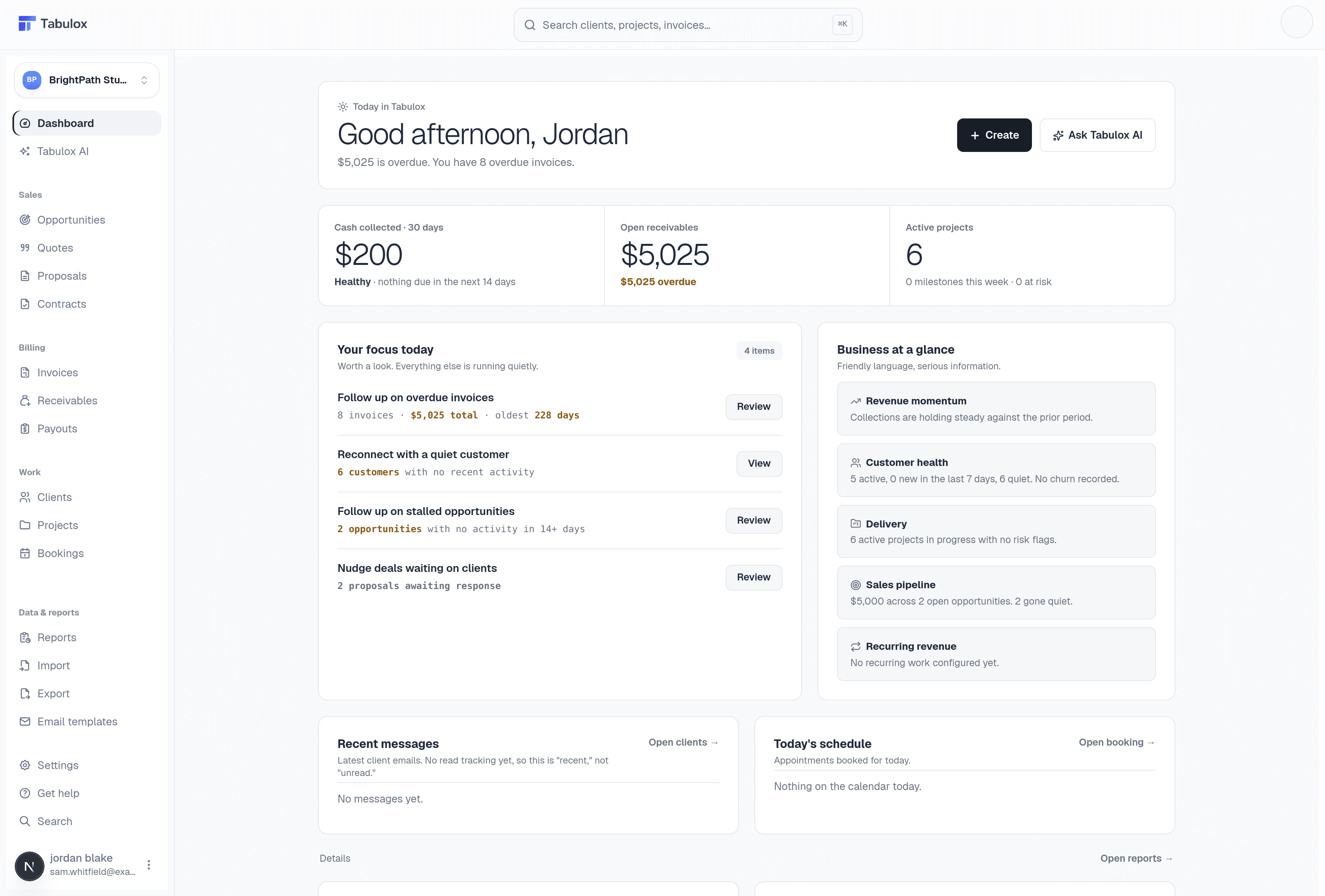
Today in Tabulox
The banner at the top greets you by name and surfaces the single most important number right now — usually how much is overdue and how many invoices that spans. It changes based on what's actually happening in your account, so on a quiet day it'll say so instead of manufacturing urgency.
The Create button next to it is a shortcut to start a new quote, invoice, proposal, contract, or opportunity without navigating away first. Ask Tabulox AI opens the assistant, which can answer questions about your data ("which clients haven't paid in 60 days?") or help draft follow-up messages.
The three headline numbers
- Cash collected · 30 days
Total payments that have actually landed in the last 30 days. The line underneath (e.g. "Healthy · nothing due in the next 14 days") is a quick read on whether collections are keeping pace with what's coming due.
- Open receivables
Everything currently unpaid across every invoice, plus how much of that is overdue. This is the same total you'll see on the Receivables page — this card is the summary, that page is where you act on it.
- Active projects
How many projects are currently in flight, and whether any have milestones due this week or are flagged at risk.
Your focus today
This panel is a short, deliberately curated to-do list — not everything in your account, just the handful of things worth a look right now. Typical items:
- Follow up on overdue invoices — how many, the total amount, and the oldest one, with a Review button straight into Receivables filtered to overdue.
- Reconnect with a quiet customer — clients with no recent activity.
- Follow up on stalled opportunities — deals sitting untouched for 14+ days, linking into Opportunities.
- Nudge deals waiting on clients — proposals or quotes sent and awaiting a response.
If everything's caught up, this panel says so plainly instead of listing stale items — "Worth a look. Everything else is running quietly" means exactly that.
Business at a glance
A set of small, plain-language tiles that summarize the health of each part of the business at a glance: revenue momentum, customer health, delivery status, sales pipeline, and recurring revenue. Each tile links to the page that has the full detail behind it.
Think of "Your focus today" as the action list and "Business at a glance" as the health check — one tells you what to do, the other tells you how things are trending.
Recent messages & today's schedule
At the bottom, two smaller panels round things out: the latest client email activity (with a link into Clients), and any appointments booked for today via Bookings.